Business Story Contest!
Enter for your chance to win $100 and Free Think Entrepreneurship T-shirts!

Deadline to submit your video is September 30, 2011 – Send to info@thinkentrepreneurship.com
Do you have a cool startup story, successful business, and passion for entrepreneurship? If so, we’d love for you to enter our business story contest! Come up with the most creative, fun, and entertaining video and you will win Continue reading
PrintPlace.com Review
Business cards are necessary for every business person looking to get their name out. As you know, there are hundreds of different styles and designs to choose from. Don’t make the mistake of getting a cheap looking and unprofessional business card as it will reflect your business poorly. Go ahead and spend a few extra bucks to get a good quality, durable, and professional card. You will be happy you did.
Big Commerce Shopping Cart Review
There are hundreds of shopping carts to choose from, which makes it a very time consuming process to find the best cart for your business. Over the years I’ve used Pinnacle Cart, X-Cart, Shopify, and a few other carts. The carts have some great features, yet none of these carts had all the features I needed and the customer service may not have been up to par.
A few months ago I was out to breakfast with a fellow entrepreneur and very successful internet retailer. He switched over to a full service shopping cart named Big Commerce and has been thrilled with it. He explained how they are using cutting edge technology to integrate the cart with mobile devices, Ipads, and other tablets. The cart also integrates with newsletters (such as MailChimp and Icontact), RSS feeds, Facebook, and many marketing tools that help get your product found by potential buyers.
Click here to try BigCommerce – the best way to sell online!

I ended up taking the plunge and purchasing Big Commerce after a free 15 day trial. It was extremely easy to setup, had all kinds of templates, and has a very detailed backend that is great for the logistics of your business.
The templates and easy drag and drop features make it easy to create an online store and eliminate the need to learn coding. Big Commerce has a feature that allows you to create contact forms and custom forms for your business. Continue reading
Using Quickbooks on your Mac Computer with Logmein.com
Accounting is a very important aspect of every small business. Thanks to Quickbooks Pro from Intuit, I’ve been able to keep tabs on my small businesses in a very efficient manner.
About two years ago I started using Mac computers and fell in love with their operating system, sleek design, and engineering. So much so that I ended up purchasing Microsoft Office, design programs, and movie editing software for the Macs. I also bought Quickbooks for Mac thinking it would be a great program.
Well, I found that Quickbooks for Mac still lacks many of the features, capabilities, and functionalities that the PC version has. So much so that I quit using the Quickbooks 2011 Pro and went back to using the PC version. The problem I had with this is that I had to carry two laptops around because I had to do the bookwork using my PC. The other option I found was to use the online version of Quickbooks which has a monthly fee that I was not real keen about.
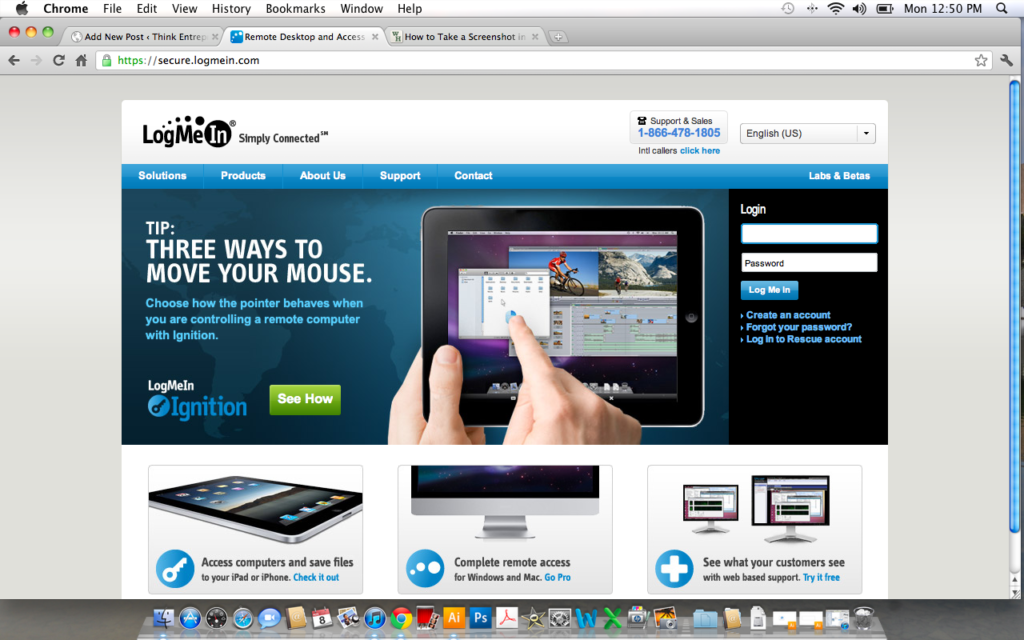
Long story short, I heard about a free program called Logmein.com. Logmein allows you to access any computer that you own as long as it is turned on and has internet access. Thus, I now have a PC on at my home office 24/7 with internet access. I can quickly use Logmein’s remote connection to log into Quickbooks on the PC from my Mac. So, whether I am at a clients business, on the road, or at a coffee shop; I have the ability to create invoices, send bills, etc all from my Mac computer.
1. To set up Logmein, first go to www.logmein.com
2. Create a free account and follow the instructions to install the software on both computers.
3. Log in from your Mac and work on your accounting! Yeah yeah, I know you are probably not that excited to do accounting, but at least this solution allows you to do it from your Mac.

Screenshot of Logmein.com above

Screenshot of what the Mac screen looks like while using Logmein.com to access the remote PC running Quickbooks.
Please post any comments, questions, or other solutions you’ve come up with.
Pete Sveen
How to Become a Notary Public
Becoming a Notary Public can be very helpful for your business and colleagues. I personally decided to become a notary public because I commonly have friends, family, and business partners with important documents such as motor vehicle titles, contracts, and legal documents that need to be notarized. In many states, all motor vehicles must have a notarized title from the seller. It can be a pain to run down to the bank to get something notarized. So, when an acquaintance of mine decides to buy a used vehicle from a private party I can come with them and get it done right then and there. It is also convenient if another friend or someone else in your business is a notary public because you can not notarize for yourself.
Becoming a Notary Public is fairly easy and the cost is generally around $100 to get started. Here is what is required for most states:
1. Filled out and notarized application that must be sent to the Secretary of State
Fee: Roughly $25.00
2. Required Training. Most states require training to become a notary. Many offer free online courses that can be completed in 2-3 hours.
3. Surety Bond: You will need to get a surety bond in order to become a notary public. Surety bonds generally last around 4 years and can be purchased for roughly $40.00 for the 4 year term. Surety bonds can be purchased online or from your local insurance agent. The National Notary Association is a good place to learn more about bonds and purchase them. https://www.nationalnotary.org/
4. Send the application, check, and surety bond to the secretary of state. Once they approve the documents they will send you a letter of certification. You will then make a copy of the letter of certification and send it to a company that can make you a notary stamp. The National Notary Association ( https://www.nationalnotary.org/ ) will make your stamp for around $20.00. You will also need a notary log book which can be purchased from a local office supply store or from the NNA website. The logbook will cost you approximately $15.00.
5. You will then be licensed to be a notary public. For more information on your state’s requirements please check out your Secretary of State’s website.